多人在线聊天室
第九组 Canary小组
2023年9月
使用QT和Python开发的多人在线聊天室
| 技术栈 | |
|---|---|
| 前端 | QT6 |
| 后端 | Python + Twisted + SQLite3 |
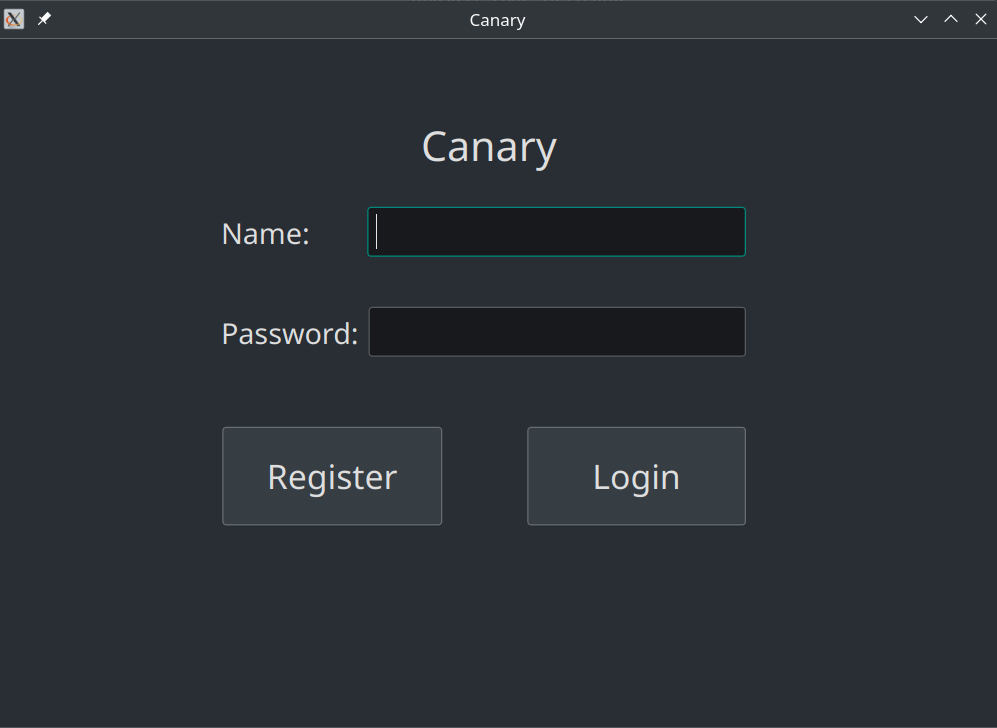
登陆页面
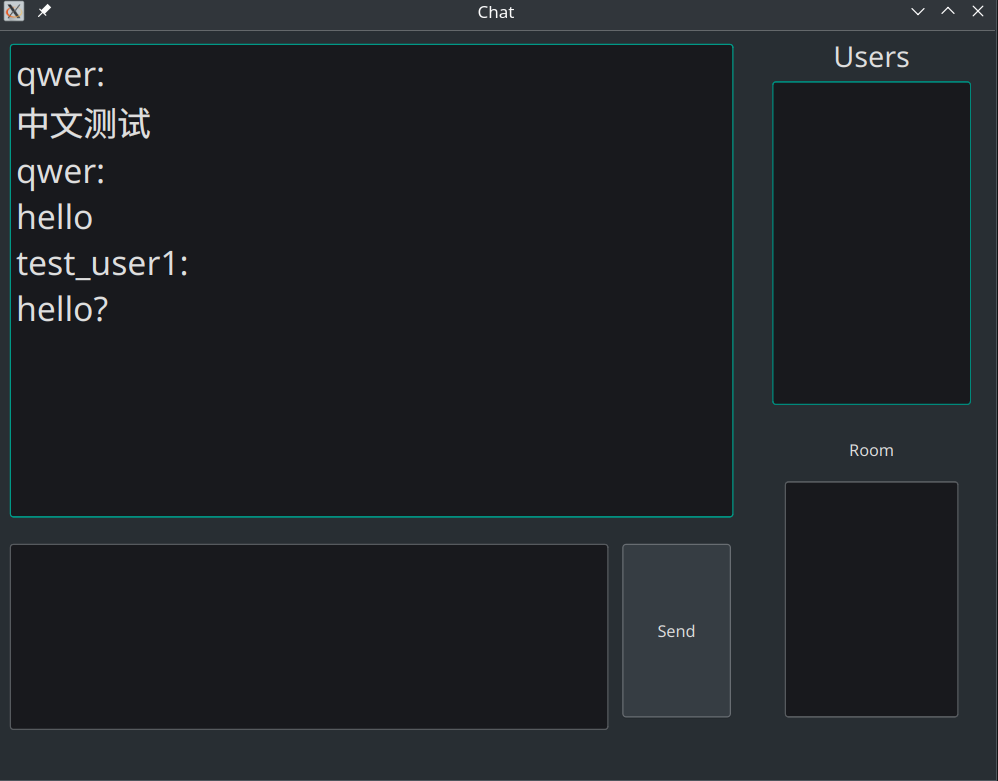
聊天页面
代码介绍
前端代码结构
.
├── chat.cpp # 聊天相关代码
├── chat.h
├── chat.pro
├── chat.ui # 聊天UI
├── launcher.cpp # 登陆相关代码
├── launcher.h
├── launcher.ui # 登陆UI
└── main.cpp
登陆页面
登陆页面需要处理的事件有 登陆 和 注册
注册事件:
void Launcher::on_RegiBtn_clicked()
{
    qDebug() << "register\n";
    _socket->connectToHost("101.42.174.249",8080);
    if (_socket->waitForConnected(5000)){
        QJsonObject mes;
        mes["Level"] = "system";
        mes["Type"] = "register";
        QJsonObject content;
        content["Username"] = ui->NameInput->text();
        content["Password"] = ui->KeyInput->text();
        mes["Content"] = content;

        QJsonDocument doc(mes);
        _socket->write(doc.toJson());
    }

    if (_socket->waitForReadyRead(5000)){
        QJsonDocument doc = QJsonDocument::fromJson(_socket->readAll());

        if (doc.isNull() || !doc.isObject()){
            throw std::runtime_error("Server Data Error\n");
        }

        QJsonObject recv = doc.object();
        if (recv["Regi_bool"].toBool()) {
            QString react = recv["Register_info"].toString();
            QMessageBox::information(this,"Tips", react);
        } else{
            QString react = recv["Register_info"].toString();
            QMessageBox::information(this,"Tips", react);
        }
    }
    _socket->close();
}
登陆事件:
void Launcher::on_LoginBtn_clicked()
{
    _socket->connectToHost("101.42.174.249",8080);
    qDebug() << "login\n";
//    _socket->connectToHost("localhost",8080);

    if (_socket->waitForConnected(5000)){
        QJsonObject mes;
        mes["Level"] = "system";
        mes["Type"] = "login";
        QJsonObject content;
        content["Username"] = ui->NameInput->text();
        content["Password"] = ui->KeyInput->text();
        mes["Content"] = content;

        QJsonDocument doc(mes);
        _socket->write(doc.toJson());
    }

    if (_socket->waitForReadyRead(5000)){
        QJsonDocument doc = QJsonDocument::fromJson(_socket->readAll());
        if (doc.isNull() || !doc.isObject()){
            throw std::runtime_error("Server Data Error\n");
        }
        QJsonObject recv = doc.object();
        if (recv["Login_bool"].toString() != "true"){
            QString er_info = recv["Login_info"].toString();
            QMessageBox::information(this,"Fatal", er_info);
            return ;
        }
        QVector<QString> name_list;
        int total = recv["User_num"].toInt();
        for(int i {1}; i <= total; ++ i){
            QString key = "user" + QString::number(i);
            name_list.push_back(recv[key].toString());
        }
        for(auto i:name_list)
        {
            qDebug() << i << "\n";
        }

        _chat = std::make_shared<Chat>(ui->NameInput->text(),_socket,this);
        _chat->Update(name_list);
        this->close();
        _chat->show();
    }
}
聊天页面
聊天分为几个区域,分别是:输入区域,消息区域,用户列表区域
当输入区域输入消息后,按下回车键,消息会发送到后端,后端会将消息广播到所有在线用户
void Chat::on_Sendbtn_clicked()
{
    QJsonObject mes;
    mes["Level"] = "user";
    mes["Type"] = "message";
    QJsonObject content;
    content["Message"] = ui->Input->toPlainText();
    content["Sender"] = _self_name;
    mes["Content"] = content;

    QJsonDocument doc(mes);
    _sock->write(doc.toJson());
    AddMessage(_self_name,ui->Input->toPlainText());

}
当程序受到消息后,会将消息显示在消息区域
void Chat::DataReceived(){
    QJsonDocument doc = QJsonDocument::fromJson(_sock->readAll());
    if (doc.isNull() || !doc.isObject()){
        throw std::runtime_error("Server Data Error\n");
    }
    QJsonObject recv = doc.object();

    if (recv["Level"] == "system"){
        if(recv["Type"] == "login_back"){
            QVector<QString> name_list;
            int total = recv["User_num"].toInt();
            for(int i {1}; i <= total; ++ i){
                QString key = "user" + QString::number(i);
                name_list.push_back(recv[key].toString());
            }
            Update(name_list);
        }
    }
    else{
        if (recv["Type"] == "message"){
            QString sender = recv["Content"].toObject()["Sender"].toString();
            QString message = recv["Content"].toObject()["Message"].toString();
            if (sender != _self_name)AddMessage(sender,message);
        }
    }
}
后端代码
我们使用 Twisted 框架来实现后端的功能,使用 SQLite3 来存储用户信息
当接收到消息后,后端会根据事件的不同分别处理:
    def processData(self, data):
        json_data = json.loads(data.decode("utf-8"))
        if json_data['Level'] == 'system' and json_data['Type'] == 'login':
            self.handleLogin(json_data)
        elif json_data['Level'] == 'system' and json_data['Type'] == 'register':
            self.handleRegister(json_data)
        elif json_data['Level'] == 'user' and json_data['Type'] == 'message':
            self.handleMessage(json_data)
        else:
            print("Unknown Message")
            print(json_data)
            pass
处理注册事件:
    def handleRegister(self, data):
        print("register")
        username = data['Content']['Username']
        password = data['Content']['Password']

        # Check if the username already exists in the database
        self.cursor.execute("SELECT * FROM users WHERE username = ?", (username,))
        row = self.cursor.fetchone()

        if row:
            # Username already exists
            response = {
                "Level": "system",
                "Type": "register_back",
                "Register_bool": "false",
                "Register_info": "Username already exists. Please choose a different username."
            }
            # Send the response only to the current client
            print("register fail")
            self.transport.write(json.dumps(response).encode("utf-8"))
        else:
            # Insert the new user into the database
            self.cursor.execute("INSERT INTO users (username, password) VALUES (?, ?)", (username, password))
            self.conn.commit()

            # Send a response to the client
            response = {
                "Level": "system",
                "Type": "register_back",
                "Register_bool": "true",
                "Register_info": "Registration successful!"
            }
            # Send the response only to the current client
            print("register done")
            self.transport.write(json.dumps(response).encode("utf-8"))
处理登陆事件:
    def handleLogin(self, data):
        print("Login")
        username = data['Content']['Username']
        password = data['Content']['Password']

        # Retrieve the user from the database
        self.cursor.execute("SELECT * FROM users WHERE username = ?", (username,))
        row = self.cursor.fetchone()

        if row and row[2] == password:
            # Username and password match
            # Send a response to the client
            response = {
                "Level": "system",
                "Type": "login_back",
                "Login_bool": "true",
                "User_num": len(self.user_list)
            }
            # Update the username for the connected user
            for user in self.user_list:
                if user.transport == self.transport:
                    user.user_name = username
                    break

            # Broadcast the response to all users
            self.MesBoardcast(self.UpdateUserListMes())
        else:
            # Username or password is incorrect
            response = {
                "Level": "system",
                "Type": "login_back",
                "Login_bool": "false"
            }
            # Send the response only to the current client
            self.transport.write(json.dumps(response).encode("utf-8"))
接收到消息广播消息:
    def MesBoardcast(self,mes):
        for i in range(len(self.user_list)):
            self.user_list[i].transport.write(json.dumps(mes).encode("utf-8"))
        print(mes)

    def handleMessage(self, data):
        print("Message")
        from_name = data["Content"]["Sender"]
        mes = data["Content"]["Message"]
        response = {
            "Level": "user",
            "Type": "message",
            "Content": {"Sender": from_name, "Message": mes},
        }
        self.MesBoardcast(response)
当有用户断开链接时也需做一些处理:
    def connectionLost(self, reason):
        # 连接断开时停止reactor
        for user in self.user_list:
            if user.transport == self.transport:
                self.user_list.remove(user)
                self.MesBoardcast(self.UpdateUserListMes())
                break
小组成员
郝庆凯 徐一鸣 唐进 王慧英 郭靖怡